Pallyy 2025 Review: Still the Best Social Media Scheduler for Agencies?
A Lot Has Changed in Social Media Marketing Since 2022
Back in 2022, I reviewed Pallyy as one of the most affordable and complete social media scheduling tools for marketers and freelancers. Fast forward to 2025… AI is everywhere; Twitter has become X, Facebook has rebranded as Meta and Instagram Reels are now more powerful than images.
Since my last post, I’ve seen more people searching for Pallyy reviews and asking whether Pally social media tools are still worth using in 2025. I am hoping to answer your question in this updated Pallyy review.
PS: Missed my original review? You can watch my YouTube Video.
It was originally launched by founder Tim Benetto as an Instagram analytics tool (called ShareMyInsights). Over time, it evolved into a full social media toolkit with scheduling, analytics, client approvals, and even a link-in-bio builder.
Today, Pallyy is used by thousands of marketers worldwide and is often praised in for its balance of simplicity, price, and agency-focused features.
How Do Marketers Use Pallyy in 2025?
Marketers don’t need another scheduling tool, they need something that makes juggling multiple accounts (and clients) way easier. That’s where Pallyy shines.
Here’s how most of us use it in real life:
Plan and schedule content in one place
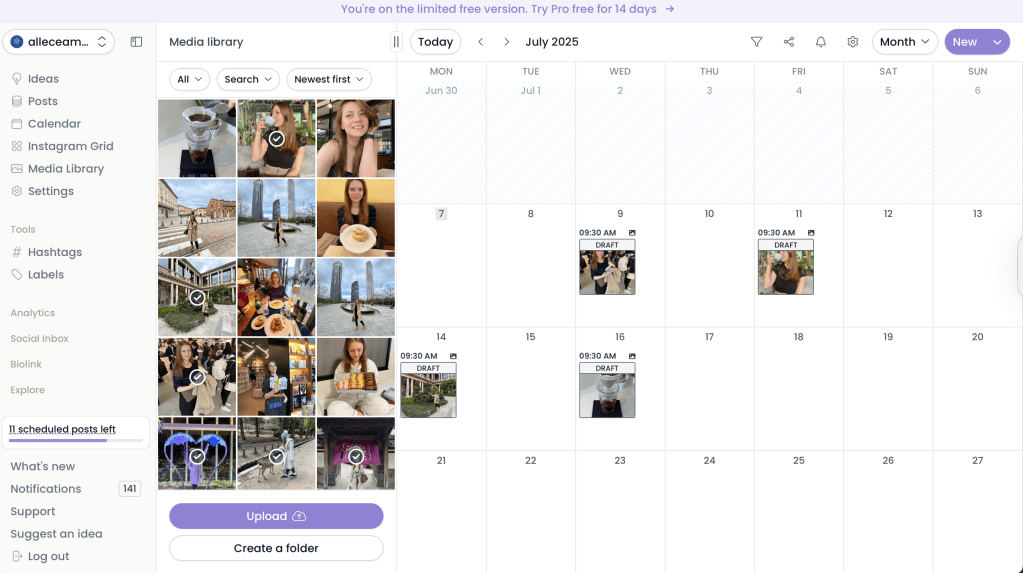
Instead of logging into 5 different apps, marketers can set it all up in the calendar inside Pallyy. The drag-and-drop planner makes it simple to plan Instagram, TikTok, LinkedIn, and more, and actually see your month at a glance.
Pallyy’s Content Calendar (Monthly View)
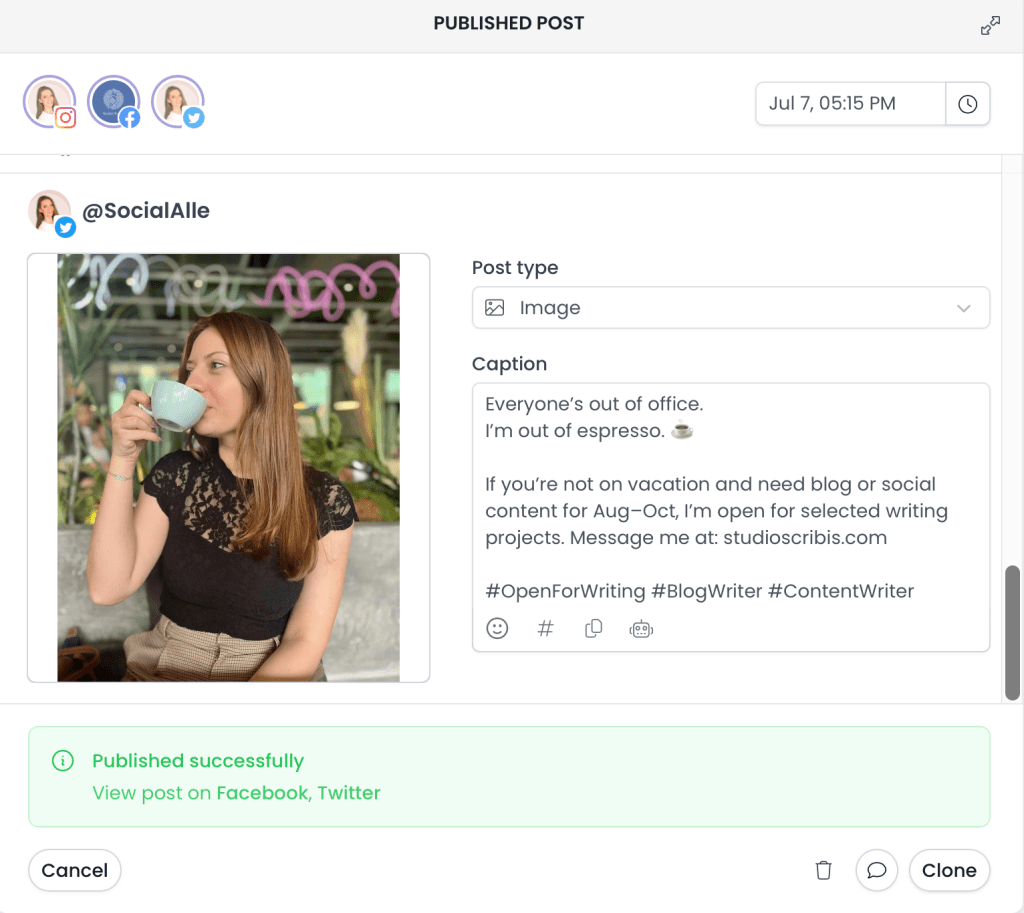
Pallyy’s Post Creator Window
Keep client workflows simple
If you manage accounts for clients, you know the pain of chasing approvals. With Pallyy, you just send a calendar link and clients can leave comments or hit approve right there.
At the end of each month, you can send analytics reports that actually show clients how their content is working. Add custom stats like engagement, reach, and followers growth, without needing to export data or work in separate spreadsheets.
In short: marketers like me use Pallyy because it cuts the busywork.
What’s New Since My 2022 Review?
Here’s what makes Pallyy even more powerful in 2025:
#1: You Can Generate Captions with AI
First, Pallyy now has an AI post generator, which makes caption writing 10x faster.
You simply describe your post, choose the tone and whether you’d like to have emojis, or hashtags and it suggests ready-made captions. If you’re like me and have to write captions for multiple clients every week, this feature honestly saves so much time.
Of course, you could use ChatGPT to format your captions – but it’s easier to work in one platform that has all the inbuilt tools.
#2: Schedule Reels & TikToks (with Reminders)
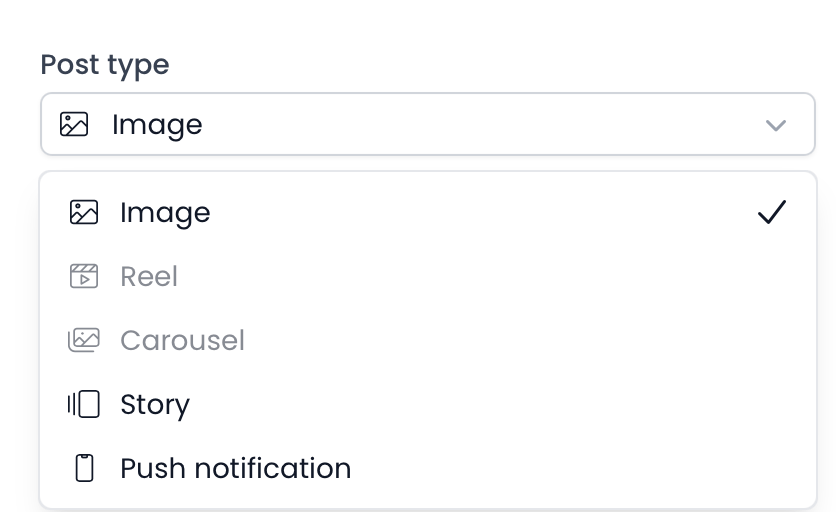
You can now upload short-form Reel videos, write your captions, and schedule them like your other posts. Since TikTok and Instagram don’t allow full auto-posting from third-party tools, you’ll get a mobile reminder when it’s time to post.
Still, having everything prepped ahead of time in one dashboard is a huge time-saver.
#3: Shareable Content Calendar with Direct Approvals
If you manage your client’s social accounts, you’ll love this feature. Pallyy now allows marketers to send their draft content calendar (as a URL link) directly to clients, and they can view each post and leave comments on them or approve them.
This makes the client review process 100x easier, and faster. I also love that they added a little “[ ]” button so clients can expand each image to view it in full size. I know it sounds like a small thing, but it really helps when you’re working on carousel (album) posts or images with small text.
#4: NEW Instagram Shoppable Posts
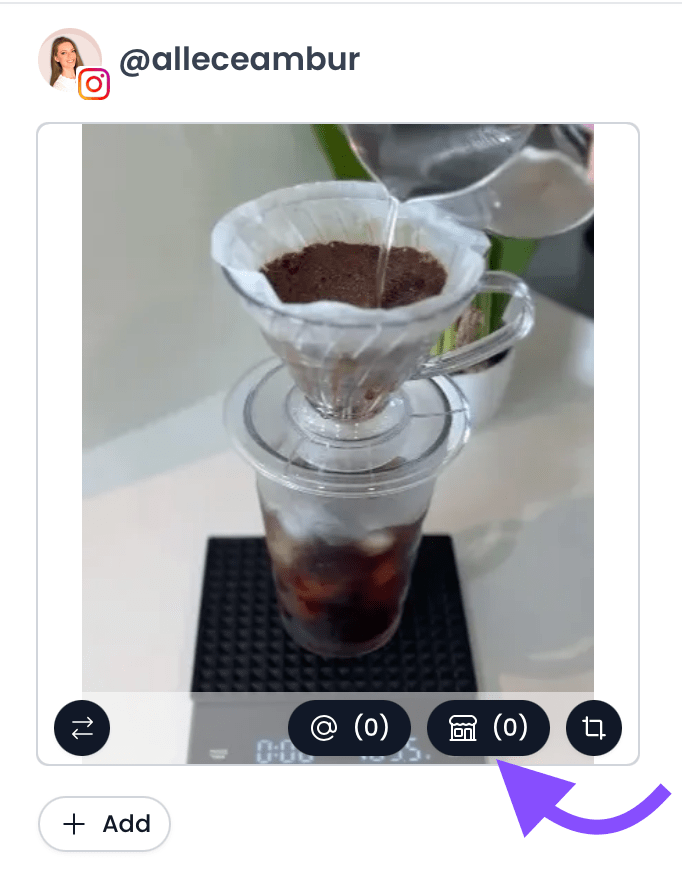
If your clients run Instagram Shops, this feature is a life saver. Pallyy now lets you tag products from your catalog directly in your scheduled posts.
Just click the shop icon on your image, choose the product, and that’s it, you’re done. It works just like tagging a person, but with products. And if you’re managing e-commerce content, this is a real time-saver.
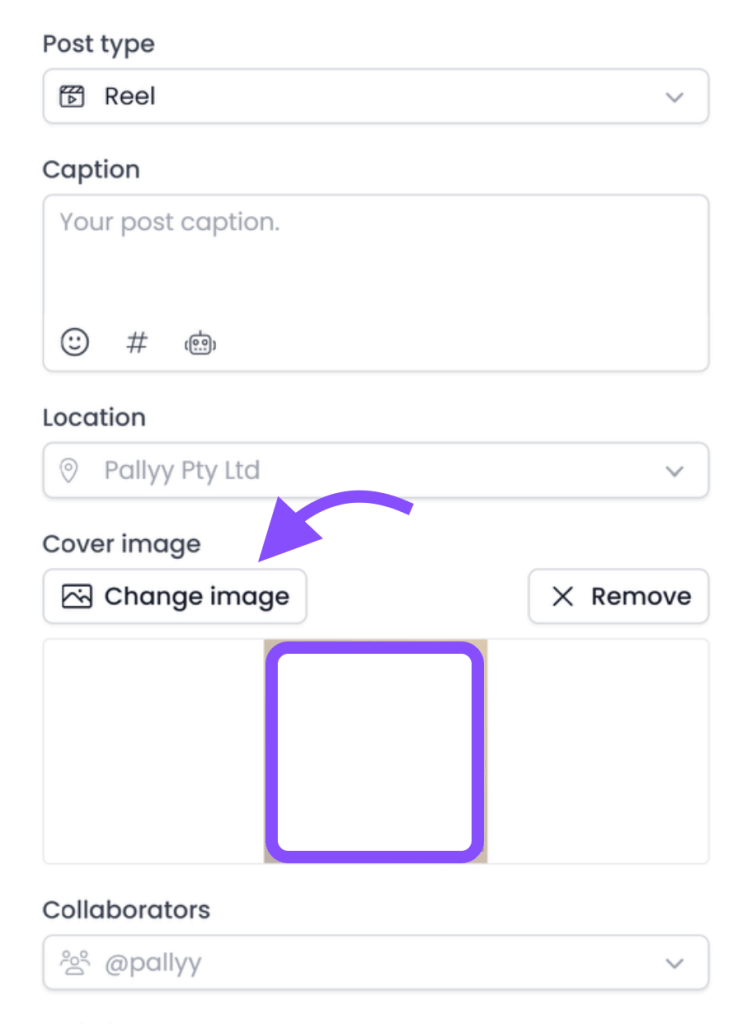
#5: NEW: Custom Reel Covers
This one’s for my fellow perfectionists. You can now upload a custom cover image for your Instagram Reels. So instead of relying on whatever awkward frame Instagram picks (you know the one), you can design your own thumbnail and keep your feed looking clean and on-brand.
I use this feature a lot when planning visual grid layouts for my social media management clients.
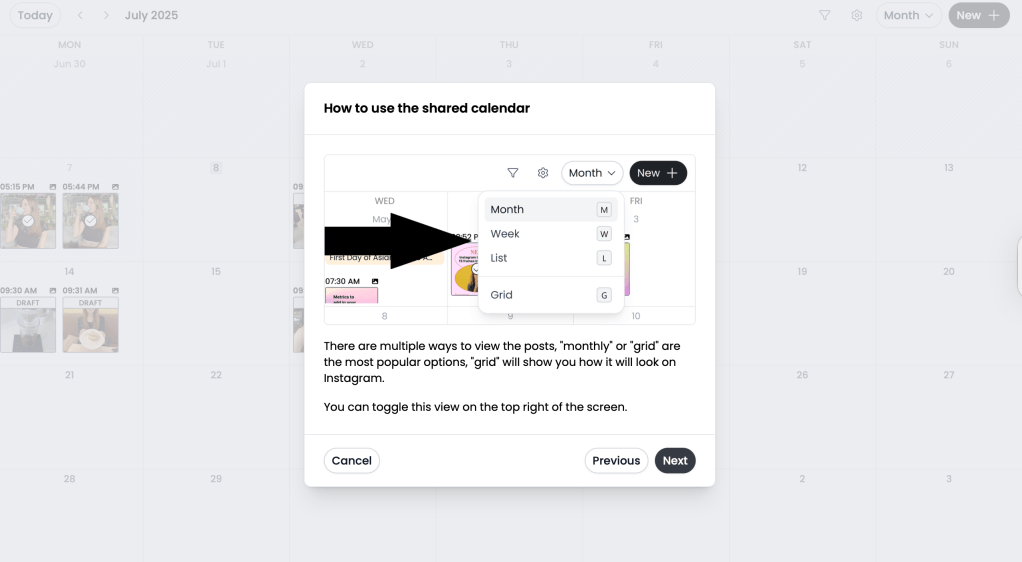
#6: Preview your Instagram Grid (+ NEW Square posts view)
You can also preview your Instagram Grid in Pallyy and change the order of posts to match your aesthetic.
#7: Smily.bio Upgrades
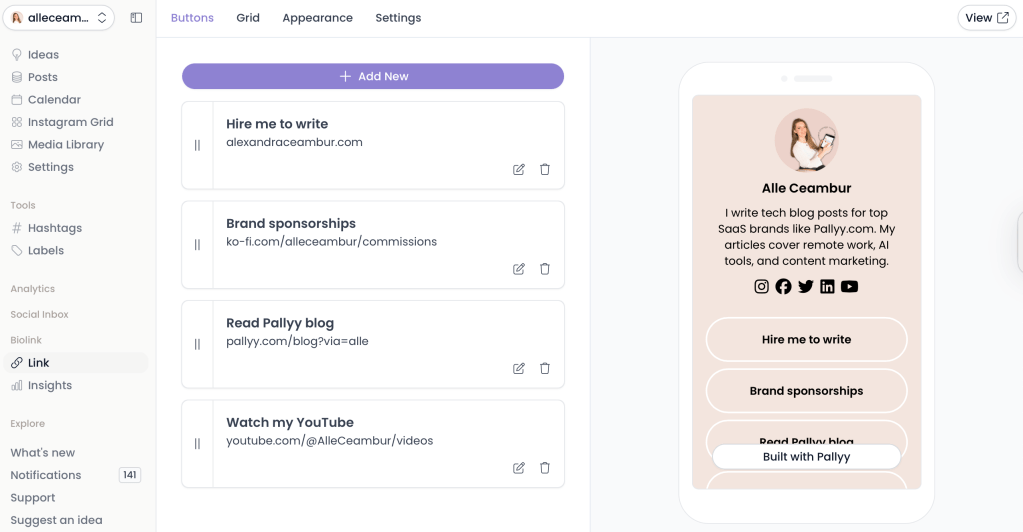
Pallyy’s native link-in-bio tool, Smily.bio, also got a nice little upgrade.
You can now customize it with branded colors, add buttons or images, and track how many people are clicking on your links.
I’ve set mine up to link to my latest YouTube videos, blog posts, affiliate links, and a booking page for my writing services, and it honestly looks way better than some of the other free bio tools out there.
Pallyy Pricing (updated: 2025)
Pallyy has reintroduced their FREE plan and I love that. It’s perfect if you want to test out the platform without feeling pressured to subscribe right away. Honestly, more tools should do this. You can schedule up to 15 posts/month across one full social set (that’s Instagram, Facebook, LinkedIn, etc.), no credit card needed.
When you’re ready to upgrade, the Standard plan is $25/month, which gives you unlimited posts for one complete social set. You can also add team members for $29/user if you’re collaborating with others.
But if you’re managing multiple brands or running an agency, the Unlimited plan at $199/month is the real value as it gives you unlimited users and social sets.
Plan
Price
Includes
Free
$0
1 social set (limited to 15 posts/month)
Premium
$25/month + $29 for additional users
1 social set, unlimited features
Unlimited
$199/month
unlimited users
Where Pallyy Falls Short
No tool is perfect, and Pallyy has its limits as well. Here are a few things I’ve noticed:
Analytics are Instagram-focused If you’re managing YouTube, LinkedIn, or even X (Twitter), you won’t find the same level of insights here. Pallyy analytics really shine for Instagram, but feels more basic or nonexistent on other platforms.
Free plan quirks The free plan is great for testing the scheduling features, but it has a lot of limitations. The 15 FREE post count can sometimes not be accurate.
Costs can add up with scale The $25/month plan is solid for solo marketers or single brands. But if you’re running multiple social sets and adding team members, the costs start stacking pretty quickly compared to Buffer or Later.
Not built for enterprises – If you’re running 50+ accounts with huge teams, tools like Sprout Social or Agorapulse have more advanced workflow automation.
In short: Pallyy nails the core features most freelancers and agencies need. But if you want advanced integrations or enterprise-level automation, you might outgrow it.
Social Media Scheduler Comparison (2025)
Let’s compare the top most popular social media schedulers for small brands and marketers.
I created this table comparing Buffer, Later and Pallyy:
Pallyy vs Buffer: For most solo marketers Buffer offers a great entry point. At just $6/month you won’t get more affordable than this.
Pallyy vs Later: If you’re a growing brand with a team, Later might fit – but can get expensive as you’re adding more team members or profiles.
Pallyy stands out as the best all-rounder with its flat-rate pricing, full features (even for Reels and TikTok), and tools built specifically for marketers and agencies.
Final Verdict: Is Pallyy Still Worth It in 2025?
After using Pallyy for over 5 years for my clients, blog, and YouTube I can confidently say it still delivers.
After using Pallyy for over 5 years for my clients, blog, and YouTube, I can confidently say it still delivers.
Pallyy continues to offer the best balance of powerful features, fair pricing, and ease of use. The drag-and-drop calendar, client approvals, and TikTok/Instagram scheduling make day-to-day management simple and affordable.
Unlike bigger platforms that charge extra for every social channel or add-on, Pallyy keeps things fair. $25/month gets you everything you need to manage your entire social media presence. And if you’re scaling up or starting a social media agency, the unlimited plan is still more affordable than most.
That said, it’s not perfect. The analytics lean heavily toward Instagram, the free plan feels a little limited, and costs can add up once you start managing multiple brands or team members.



 Studio Scribis
Leave a comment