
Back in 2022, I wrote a review of Buffer app – one of the most talked about schedulers in social media marketing. At that time, I appreciated Buffer for its simplicity, affordability, and clean interface. But the social media landscape has changed a lot since my last review.
And since I recently updated my Pallyy review, I decided to revisit Buffer in 2025, test the latest version, and see what’s new, and whether it’s worth it.
Here’s my updated review of Buffer app for social media management.
What is Buffer App?
If you’re not familiar with this app, here’s a brief intro.
Buffer was lunched in 2010 as a simple tweet scheduler built by Joel Gascoigne. He revealed jumping around his room after receiving the first $5 payment through PayPal days after the initial launch. From that day onward, Buffer started growing into one of the most popular app for scheduling social media posts.
The idea for Buffer was simple: instead of manually posting at the right time, Buffer lets users create posts in advance and publish them automatically. It began as a Chrome extension and quickly gained traction with creators who wanted an easier way to post on social media.
Fun fact: According to Martechview, Buffer hit 20,000 users in 2011, moved from the UK to San Francisco, and faced 88% rejection before finally landing $450k in seed funding.
Buffer Today
Today, Buffer is used by over 7 million people and 75,000 brands, including giants like Shopify, Trello and Microsoft.
What makes them stand out is transparency: they share employees salaries, public revenue dashboards, and adopt a customer-first culture (around 25% of the team works in customer support).
In 2014, the founders and even turned down a nine-figure acquisition and bought out their VCs in 2018 to stick to their values. The result? Buffer kept its focus on simplicity, independence and meeting clients needs.
It’s still one of the cleanest, most beginner-friendly scheduling tools around.
What’s Changed at Buffer Since My 2022 Review?
When I last reviewed Buffer in 2022, the app already had a reputation for being user friendly. But it was also a bit too simplistic, and lacked more advanced features compared to tools like Pallyy or Hootsuite.
But, they haven’t been sleeping. Here are the most notable updates since then:
- Buffer AI Assistant Buffer now includes a new AI writing tool for captions. Honestly? I found it a bit too formal, rigid in writing captions and too hashtag-heavy. So, not my favorite AI tool for captions, but worth mentioning.
- Instagram Features Expanded – You can now schedule Reels, Stories, and even tag products in your Instagram posts. However, some features (like adding Music) still require manual posting.
- Post Ideas/Templates Tab – A newly added feature that helps you create quick posts like quotes, to-do lists, or share updates without starting from scratch. It’s a good idea!
- Pricing Update – Back in 2022, Buffer cost around $5/month per channel. Today it’s $6/month per channel. Still affordable compared to bigger tools, but a slight increase.
In short: Buffer hasn’t fully revamped itself, but it has improved on its strengths and added a few useful features that I can mostly appreciate.
How Buffer Works (Tested in 2025)
Using Buffer in 2025 still feels… effortless. That’s honestly its biggest strength.
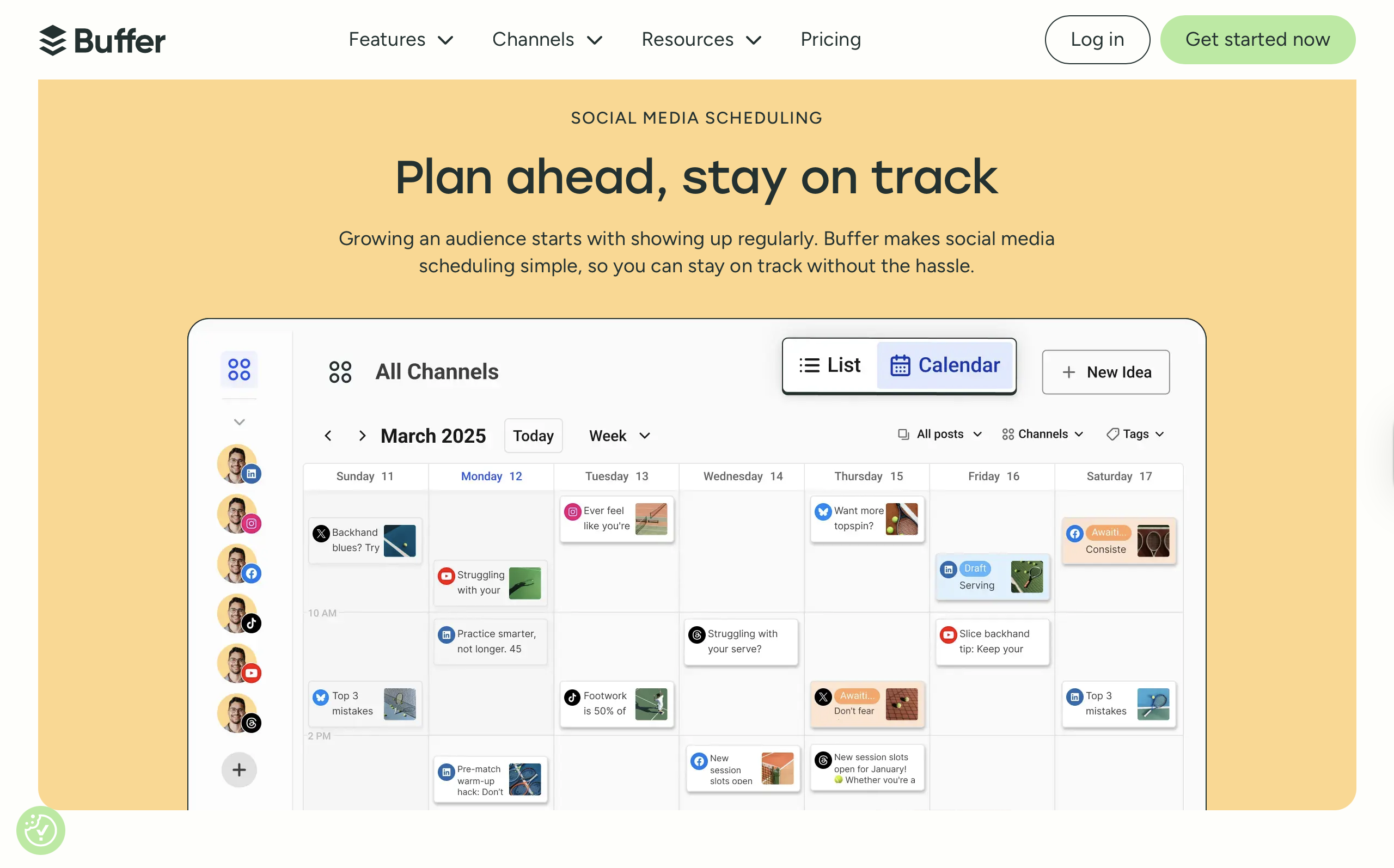
You start with a free account and connect your social profiles in a couple of clicks. The dashboard is where Buffer really shines: on the left, you see all your connected channels; in the middle, a clean content calendar; and on top, workflow tabs like: Create, Publish, Analyze. No information overload, no confusion.
Creating a post in Buffer is quick. Just tap on the calendar, upload your image or reel, write a caption and pick whether to save draft or schedule for publishing.
What I like most is that Buffer saves your usual posting times, so scheduling future posts is basically a one-click process. Compared to other schedulers that try to do “everything,” Buffer feels refreshingly straightforward.
Here’s how a typical scheduling workflow looks like 2025:
Sign Up – Create a free account with your email and log in. (Super easy and takes a few minutes!)
Connect Channels – On the free plan, you can connect up to 3 social media accounts.

Get Familiar with the Dashboard – On the Left you have your Social Channels, On top row you have your workflows (eg: Create, Publish, Analyze), and in the center you have your content calendar.

Create a New Post – Tap on the calendar in the middle of the page and click + Add a Post.
Customize Your Post – Upload an image, reel video, or story. For Instagram, make sure your image is 4:5 ratio (or use the built-in cropping tool) in order to be eligible for auto-posting.

Write a Caption – Either write your own caption or try the new Buffer AI assistant. Personally, I didn’t like the AI captions it generated, they felt stiff and overstuffed with hashtags.
Save Draft or Schedule Post – You can either save the draft or schedule it for later. Buffer lets you save standard posting times, which makes scheduling really quick.
Alle’s Verdict: The interface is still Buffer’s strongest point. All your connected channels sit neatly on the left, while the middle shows your planning calendar. I think Buffer has the easiest-to-navigate dashboard among all social media scheduling tools I’ve tried. Highly recommend it for beginners.
Buffer Pros in 2025
Here’s what I really like about using Buffer App for social media:
- Clean & Intuitive UI – Still one of the best-designed social scheduling tools. Easy for beginners. Lovely to use by professionals.
- Affordable Pricing – At $6/month per channel (inclusive of Analytics), Buffer remains cheaper than most competitors.
- Instagram-Friendly App – It’s an Instragram-first app, so you can schedule all types of content supported on Instagram: Image post, Reels video, Stories, and product-tagged posts. They also have a grid preview to help you in planning aesthetic feeds.
- Post Templates – A nice starting point if you’re stuck for content ideas.
- Saved Posting Times – Great for planning your own posting schedule, and analyzing when your audience engages most.
The Buffer app shines at simplicity and Instagram-first scheduling features. This is why, it’s still relevant for their target audience even today.
Buffer Cons in 2025
Despite being easy to use, here are some downsides of using Buffer for social media management:
- Buffer AI Assistant Isn’t Great – I know that now the trend is to incorporate AI assistants on every tool. But this one is not worth relying on for me. The captions generated are too formal, generic, and stuffed with hashtags that don’t even tell a story…
- Limited Integrations – This app is a standalone tool, so not ideal for bigger teams that need workflow flexibility, and need integrations with other apps.
- Manual Posting For Some Posts – Some Instagram posts (like those with added music) can’t be auto-published. You still need to post manually which is a disadvantage.
The cons make it challenging and lacking in some features compared to more advanced social media scheduling tools.
Buffer Pricing (2025 Update)
So has Buffer increased the price? Here’s what the current pricing plans look like:
- Free Plan – inlcudes up to 3 channels, and only scheduling features, no analytics.
- Essentials Plan – $6/month per channel, includes scheduling + analytics. (This went up from $5 in 2022).
- Team & Agency Plans – Higher tiers available, but pricing is per channel, so costs add up quickly for larger teams.
Compared to 2022, Buffer has slightly increased its price but kept things affordable for individuals and small businesses. Starting at $6/month, Buffer is very affordable in comparison to Pallyy who switched to a single standard plan of $18/month. They’ve both added new scheduling features, mainly for Instagram scheduling.
Pricing Comparison: Buffer vs Pallyy
| Tool | Free Plan | Paid Plan(s) | Strengths | Weaknesses |
|---|---|---|---|---|
| Buffer | – up to 3 channels – scheduling only – no analytics | -$25/month per social set (unlimited posts, shared client calendars, custom reports, etc.) | – clean UI – Instagram-first features – simple workflow – affordable | Pricing adds up per channel, limited integrations, AI captions weak |
| Pallyy | – 1 social set – basic analytics – 15 posts/month | – $25/month per social set (unlimited posts, shared client calendars, custom reports, etc.) | – flat pricing – client & team collaboration – full analytics | If you manage many brands, costs and add-on users may add up |
PS: You can read my updated Pallyy review here.
Final Verdict: Is Buffer Still Worth It in 2025?
If you’re a solo creator, freelancer, or small business, yes – Buffer is still worth using. It’s simple to use and reliable. The free plan is generous enough to let you test the scheduling features for 3 different channels, and the $6/month plan is a fair price for scheduling + analytics.
But if you’re managing multiple clients or need advanced team collaboration features, you might find Buffer too limited. Tools like Pallyy (with built-in collaboration) or Later (with deeper integrations) could be a better option.
For me, the biggest win for Buffer in 2025 is still its simplicity. It’s a tool that doesn’t overwhelm you with bells and whistles, it just does what it promised – create, publish, analyze.
My takeaway: Buffer hasn’t changed dramatically since 2022, but it has quietly improved. If you value a clean, distraction-free scheduling tool at a low price, it’s still one of the best options out there.
Leave a Reply